
🟢 USB-Stick wird in Windows nicht erkannt 👉 https://youtu.be/0D5n-IC_rgM
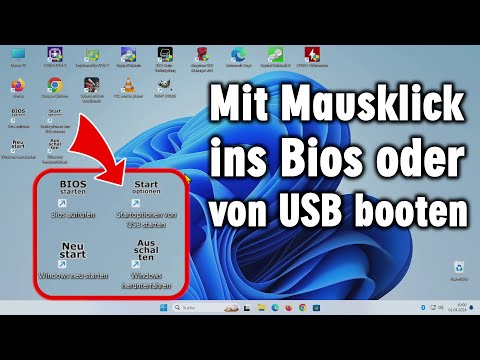
Mit wenigen Mausklicks und dem Windows Shutdown-Befehl kann man bei jedem Windows 11 oder Windows 10-PC in Sekunden ins Bios kommen oder von einem USB-Stick booten, ohne vorher den PC aus- und wieder einschalten zu müssen und ohne auf verschiedenste Tasten wie Entfernen, F12, F10 oder andere zu einem bestimmten Zeitpunkt drücken zu müssen, was oft überhaupt nicht funktioniert.
Der Windows Shutdown-Befehl kann noch mehr als Windows herunterzufahren. Mit der Option /o ruft man die Windows-Boot-Optionen auf. Mit der Option /fw ruft man die PC oder Laptop-Firmware, also das Bios, auf.
So kann man von einem USB-Stick booten oder im Bios Einstellungen ganz einfach vornehmen. Das alles funktioniert bei jedem PC oder Laptop gleich, egal welcher Hersteller.
🟢 Tolle Hardware-Geschichte der letzten 30 Jahre
👉 https://tuhlteim-pedia.de
🔵 PC-Support direkt für Windows und Linux
🔵 👉 https://tuhlteim.de
🔵 👉 https://tuhlteim-pedia.de
🔵 👉 https://technik-hauptstadt.de
shutdown /r /fw /t 10 /c "PC startet ins Bios"
shutdown /r /o /t 10 /c "PC startet mit Optionen - USB-Boot"
shutdown /s /t 10 /c "PC schaltet sich aus"
shutdown /r /t 10 /c "PC wird neu gestartet"
00:00 Shortcut ins Bios
01:48 Booten von USB-Stick
03:28 Einfache Batch-Dateien
06:04 Verknüpfung aufs Desktop legen
07:16 Eigenes Icon einfach erstellen
10:04 Microsoft shutdown Webseite
🔵 Youtube - Alle Windows 11 Videos und wie man die Systemanforderungen umgeht
👉 https://www.youtube.com/playlist?list=PL3P-jdLnG4I3UoY3kNC1TOPwe12Ql8qGW
🔵 Youtube - Alle Windows 10 Videos und wie man Windows schneller macht
👉 https://www.youtube.com/playlist?list=PL3P-jdLnG4I1Ykm4NyxRy1sgWITSlOlel
Mega Kauf oder Mega Fail 👉 https://youtu.be/BPyboMYpEtI
Windows sicherer machen - Downloads einfach mit HASH-Werten prüfen 👉 https://youtu.be/997aBDXJA5g
Geschäftsmodell Soundbar - alte Technik teuer neu verkauft 👉 https://youtu.be/i89rRzMPyGw
Bitte 10 Jahre alte Mainboards weiterbenutzen! Es lohnt sich! 👉 https://youtu.be/o6a0x2yuAuA
Windows 11 alle Caches löschen - Probleme vorbeugen 👉 https://youtu.be/PSZl6pAfeEc
Neuer Microsoft Servicevertrag - MS kontrolliert jetzt alle Daten 👉 https://youtu.be/ZGqbwazQ0-k
Alte SSDs und HDDs weiter verwenden - Windows 11 und 10 👉 https://youtu.be/RxZTXw4MkL0
Intel 286 Prozessor mit Monster-Platine und CTX-Röhrenmonitor - Escom PC 1989 Germany 👉 https://youtu.be/eQdmoSpkLuk
Nagelneues Gaming-Mainboard Schrott beim Einbauen? MSI MAG B550 Tomahawk AM4 mit Ryzen defekt? 👉 https://youtu.be/S5g1AjFeEyk
Altes Smartphone als Webcam ⭐️ für Skype ▪️ Zoom ▪️ OBS ▪️ Windows 10 ▪️ kostenlose App 👉 https://youtu.be/HiRo-P4IU_8
PC Mainboard defekt 😕️ Pins verbogen ▪️ Batterie ausgelaufen ▪️ Leiterbahnen reparieren 👉 https://youtu.be/CPMTXuU9kAM
Längst vergessene geniale Videospiele - Smartwatch 1983 👉 https://youtu.be/z4qwCsnuciA
So bitte nicht - Computerfund unter freiem Himmel - Retro PC retten vorm Müll 👉 https://youtu.be/fCEFFgzHJtI
Ubuntu Linux installieren - Download - USB-Stick erstellen - auf UEFI Notebook installieren 👉 https://youtu.be/QPG8o_fmBok
Windows 10 gegen Ubuntu 17 Linux Test auf identischen neuen UEFI Notebooks 👉 https://youtu.be/ktGEZSyRb3Q
Tuhl Teim DE - über 1.000 Videos ►https://www.youtube.com/@TuhlTeimDE
Tuhl Teim DE hier kostenlos auf YouTube abonnieren ► https://www.youtube.com/@TuhlTeimDE?sub_confirmation=1

🎬 Random Video Generator: Unbiased Discovery & Surprise Videos! 🤩
Tired of the same recommended videos? Our Random Video Generator offers a unique experience, providing unfiltered access to YouTube's massive library. 📚 Unlike typical YouTube browsing, which is influenced by algorithms and viewing history, this tool delivers truly random videos. 🌈 Explore diverse content and gain a fresh perspective on YouTube's vastness.
How Our Random Video Generator Works ⚙️
We've developed a sophisticated method to bypass YouTube's inherent search biases. 🤖 By leveraging the YouTube API and innovative techniques, we generate near-perfectly random video links. 🔗 This solves the problem of YouTube's lack of a direct "random video" feature, ensuring a truly unpredictable and exciting viewing experience. 🤯
Why Use Our Random Video Generator? 🤔
Unbiased Video Discovery: 🕵️♀️ Experience YouTube content free from algorithmic recommendations. Find videos you'd never see through regular browsing. ✨
Explore YouTube's Vast Library: 🌐 Discover the full scope of YouTube's content, from niche videos to viral hits. 📈
Analyze Video Trends: 📊 Compare video popularity against the broader YouTube landscape. A useful tool for content creators and marketers. 🔍
Enjoy Novel Entertainment: 🎉 Add spontaneity to your viewing habits and find unexpected, hidden gems. 💎
About YouTube and Random Video Generation 📺
YouTube is a global video-sharing platform with millions of hours of content. 🌍 Our random video generator provides a unique way to experience this vast platform. 🔄 It's perfect for those seeking to break free from algorithmic bubbles and discover new content. 🆓 YouTube's support for creators through AdSense and premium subscriptions makes this diverse content possible. 💰
List of ours generators⚡
Random YouTube Videos Generator
Random Film and Animation Video Generator
Random Autos and Vehicles Video Generator
Random Pets and Animals Video Generator
Random Travel and Events Video Generator
Random People and Blogs Video Generator
Random Entertainment Video Generator
Random News and Politics Video Generator
Random Howto and Style Video Generator
Random Education Video Generator