
Frankenstein-PC 👉 https://youtu.be/7Rm_FMT9ttU
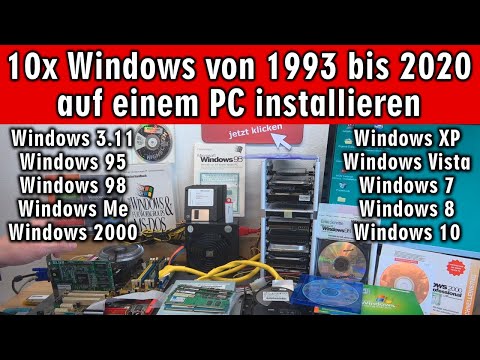
Ein Mainboard auf dem alle Microsoft-Windows Versionen laufen wäre nicht schlecht. Hier in diesem Video ist es ein Asus P5GDC Deluxe Mainboard mit Sockel 775 und einem Intel Celeron Prozessor. Das Mainboard hat DDR1 und DDR2 RAM-Steckplätze, PCI und PCI-Express und IDE (ATAPI/PATA) und SATA-Anschlüsse.
Gebrauchte Mainboards für alte und neue Windows-Versionen
👉 https://tuhl.info/Gebrauchte_Mainboards [Anzeige]
Das Bios unterstützt IDE-Festplatte, SATA-SSDs und Diskettenlaufwerke. Somit schon eine gute Ausgangsbasis für MS-DOS und Windows 3.11. Im Video werden nacheinander alle Desktop-Microsoft-Windows-Versionen installiert (außer Windows NT – wer mag das schon 🤔)
Fertige Benchtables
👉 https://tuhl.info/fertige_Benchtables [Anzeige]
Interessant ist der Patch für Windows 95, der benötigt wird, wenn die CPU schneller als 350MHz ist, da Windows 95 meistens mit einem IOS-Error beim Starten abstürzt. Microsoft hatte diesen Bug in Windows 98 behoben und sogar selbst einen Patch für Windows 95 angeboten (amdk6upd.exe)
⭐⭐⭐ Die Windows-Versionen ⭐⭐⭐
🟢 1993 - DOS und Windows 3.11 - 4:25
Wer kennt es noch? MS-DOS 6.22 + Windows 3.11 👉 https://youtu.be/sEQ-s11YZlE
🟢 1995 - Windows 95 - 10:34
Nach 25 Jahren Windows 95 auf SSD installieren - bootet in 8 Sekunden 👉 https://youtu.be/rD3iTfM7Pkk
🟢 1998 - Windows 98 - 15:40
Windows 98 auf SD-Karte installieren 💻 Notebook 1998 👉 https://youtu.be/AG3Fk6IH_TU
🟢 2000 - Windows Me - 19:12
Windows Me auf SSD installieren ✅ Nvidia Riva TNT2 👉 https://youtu.be/dEzwGx75l_Q
🟢 2000 - Windows 2000 - 24:40
Der Fujitsu-Siemens PC "T-Bird" 👉 https://youtu.be/-fJ9OdiY5Xk
🟢 2001 - Windows XP - 29:15
Windows 10 + 7+ XP Multiboot Dual Boot mit Startmenü 👉 https://youtu.be/1Srn0Noh0ug
🟢 2007 - Windows Vista - 35:25
Von Schrott zu Hot – 17 Jahre Athlon XP 2000 BigTower wieder hygienisch lecker 👉 https://youtu.be/M8tF3wNQC0s
🟢 2009 - Windows 7 - 38:40
Kostenloses Upgrade von Windows 7 auf Windows 10 ⭐ Jetzt noch schnell installieren 👉 https://youtu.be/mzp0Z2QQdIQ
🟢 2012 - Windows 8 - 43:07
Windows 8.1 optimal installieren, aktivieren und unbekannte Treiber finden 👉 https://youtu.be/Ho3d_ewV_SI
🟢 2015 - Windows 10 - 47:25
Windows 10 👉 bitte nicht 5x auf "Windows" klicken 🤨 👉 https://youtu.be/TMdC6fg5dDc
⭐ Der Windows 95 CPU-Patch
http://lonecrusader.x10host.com/fix95cpu.html
🔴 Neue Gaming-Laptops für kleines Geld
👉 https://tuhl.info/Gaming_Laptops_Windows10 [Anzeige]
🔴 Auf der Seite Technik Hauptstadt findet Ihr Tipps und Tricks auch für Playstation, Xbox, Apple usw.
👉 https://technik-hauptstadt.de
🔴 Gebrauchte PCs ab eins Euro
👉 https://tuhl.info/Gebrauchte-PCs-ab-1Euro [Anzeige]
🟢 Werkzeuge, die man zum Reparieren haben sollte 🟢 [Anzeige]
👉 https://tuhl.info/USB-Tester
👉 https://tuhl.info/Kondensatoren-Set
👉 https://tuhl.info/PC-Mainboard-Diagnose
👉 https://tuhl.info/Labornetzteil
👉 https://tuhl.info/Bios-Batterie
👉 https://tuhl.info/Platinenreiniger
👉 https://tuhl.info/Digitale_Multimeter
👉 https://tuhl.info/Aussensechskantschraubendreherset
👉 https://tuhl.info/Plastik-Werkzeuge
👉 https://tuhl.info/ATX-Netzteiltester
👉 https://tuhl.info/heissluft-lötstation
👉 https://tuhl.info/Isopropanol
👉 https://tuhl.info/Nietzangen_und_Nieten
👉 https://tuhl.info/Lüfteröl
Gekauft 📦 und für 1 Cent repariert 👉 https://youtu.be/DBIa24hRP9s
AMD Ryzen mit Fernbedienung ▪ Back To The Future ▪ RGB LED Gaming PC 👉 https://youtu.be/kd4a86M0FKQ
Daten sicher verschlüsseln in Windows 10 ⭐ USB-Stick ◾ Festplatte ◾ SSD 👉 https://youtu.be/BhcjUqjOcS4
Notebooks überhitzen heimlich 🔥 105 Grad ⭐ Lüfter heute schon sauber gemacht? 👉 https://youtu.be/T3LNGcPVT00
Tuhl Teim DE - über 670 Videos ► https://goo.gl/pfDG1i
Tuhl Teim DE hier kostenlos auf YouTube abonnieren ► https://goo.gl/JJt8UC

🎬 Random Video Generator: Unbiased Discovery & Surprise Videos! 🤩
Tired of the same recommended videos? Our Random Video Generator offers a unique experience, providing unfiltered access to YouTube's massive library. 📚 Unlike typical YouTube browsing, which is influenced by algorithms and viewing history, this tool delivers truly random videos. 🌈 Explore diverse content and gain a fresh perspective on YouTube's vastness.
How Our Random Video Generator Works ⚙️
We've developed a sophisticated method to bypass YouTube's inherent search biases. 🤖 By leveraging the YouTube API and innovative techniques, we generate near-perfectly random video links. 🔗 This solves the problem of YouTube's lack of a direct "random video" feature, ensuring a truly unpredictable and exciting viewing experience. 🤯
Why Use Our Random Video Generator? 🤔
Unbiased Video Discovery: 🕵️♀️ Experience YouTube content free from algorithmic recommendations. Find videos you'd never see through regular browsing. ✨
Explore YouTube's Vast Library: 🌐 Discover the full scope of YouTube's content, from niche videos to viral hits. 📈
Analyze Video Trends: 📊 Compare video popularity against the broader YouTube landscape. A useful tool for content creators and marketers. 🔍
Enjoy Novel Entertainment: 🎉 Add spontaneity to your viewing habits and find unexpected, hidden gems. 💎
About YouTube and Random Video Generation 📺
YouTube is a global video-sharing platform with millions of hours of content. 🌍 Our random video generator provides a unique way to experience this vast platform. 🔄 It's perfect for those seeking to break free from algorithmic bubbles and discover new content. 🆓 YouTube's support for creators through AdSense and premium subscriptions makes this diverse content possible. 💰
List of ours generators⚡
Random YouTube Videos Generator
Random Film and Animation Video Generator
Random Autos and Vehicles Video Generator
Random Pets and Animals Video Generator
Random Travel and Events Video Generator
Random People and Blogs Video Generator
Random Entertainment Video Generator
Random News and Politics Video Generator
Random Howto and Style Video Generator
Random Education Video Generator